Creating a Custom Lint Package for Better Code Quality in Flutter
Enhancing Code Quality and Maintainability in Flutter Projects with Custom Linting
Posted on Medium on 12 June 2023

Photo by Artur Shamsutdinov on Unsplash
Problem
Flutter is awesome and Dart’s static analysis makes it extremely powerful for catching bugs early with its type safety. However, we have all seen a few projects with some code smells that makes maintainability hard, even when you toggle on all important lint rules or use a pre-defined set of rules, like the very_good_analysis package.
One of the most common problems I have seen is logic in the UI, which usually starts with some innocent methods on a widget to switch features on and off, but then it suddenly grows out of proportions. When you see, someone just wrote an entire small application inside that widget and it is all tangled together.
Also, let’s not forget the infamous practice of using strings in conditionals and switch statements instead of enums. Who needs “user.status == ‘active’” repeated throughout the codebase?
Another common problem I see often is the infamous primitive obsession, where developers with a different background are not familiar with Object Oriented Programming start writing complex logic using strings to represent something else.
Take, for instance, the classic “date as a string” approach. We have all seen this before: someone wanted to manipulate a date value, but instead of using a DateTime object and its methods, decided to go rogue and store that date as a string. It’s downhill after that. Want to know the month? Split the string into an iterable and get the second element!
Your heart skips a beat and a tear forms on the corner of your eye.
This may seem unreal, but the example below is based on things I have seen in published apps:
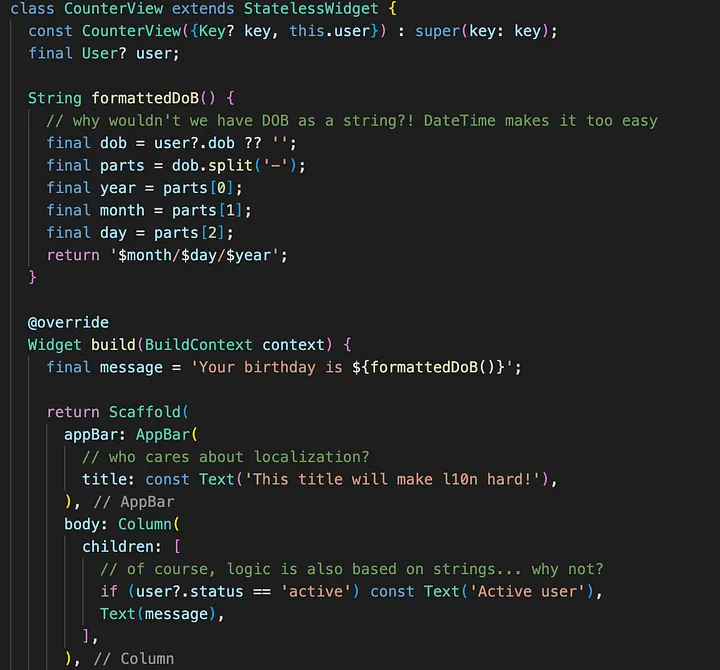
Yes, stuff like this exists out there
You end up with scattered methods for parsing, validating, and formatting values all over the place, making maintenance a nightmare. And when internationali(z)sation becomes a requirement, well, things go from bad to worse.
And it goes without saying that there are absolute no tests or comments written when you find something like this. Refactoring and cleaning this mess is always risky.
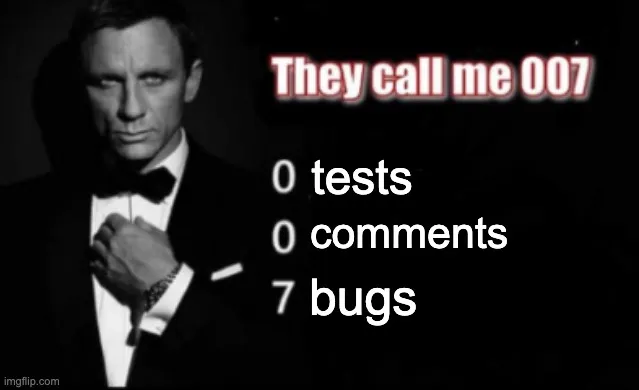
Source: https://imgflip.com/
Solution
These issues usually start from network requests, where developers don’t know how to serialise and convert JSON maps into objects that actually represent what you want. Of course the real best solution here is to use json_serializable with your own custom converters and get rid of all that primitive obsession on its root.
But what if your collaborators continue to neglect the beauty of json_serializable (and freezed)?
That’s when a custom lint rule comes in handy to start pointing out all the smell they are creating and bring to attention the importance of the above solution. (Or until they turn off static analysis, because why bother?)
Enter flutter_sane_lints
With this in mind, I published my own linter plugin, flutter_sane_lints, using custom_lint that focus on warning devs about creating these ad-hoc strings inside widgets to help maintainers.
It is a very simple rule: if you start declaring string literals or interpolating strings inside a Widget/State, or even when invoking the constructor to create instances of a Widget, you will get a warning.
Sure, this will not put an end to this issue, but at least it will force developers to write these smells in a different place, not in the UI. Maintainability and testing will then be easier.
By installing and enabling this linter plugin, the example code I showed before is immediately targeted by the analyzer with a few warnings:
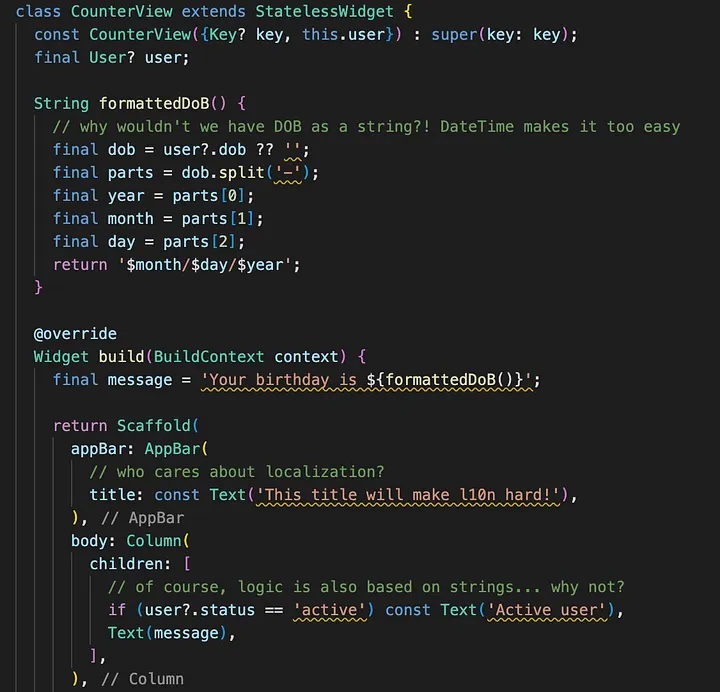
Warnings for the win!
Then, with all these problems showing up on the analyzer, chances are the project maintainer (or even your CI/CD workflows) will block any PR with this mess.
Goal
But the real goal here is not to have a lint rule that puts an end to these bad habits. No, this will come naturally with learning and self-improvement. The real goal of this exercise is to implement this rule! How do you tell the analysis server where to give this warning? This is where the custom_lint and the analyzer API comes in place.
We all study compilers and the AST (Abstract Syntax Tree) at some point, but we usually stop after seeing the theory. I wanted to experiment with it and see what it is really like under the hood.
I confess the analyzer API looked a bit overwhelming at first glance, because of the huge amount of AST nodes there are. Really, have a look at the API here, there are hundreds of AST nodes. However, after studying a little and, of course, playing around with it, I was able start making progress. Then, at the moment you get your first idea right, it just flows so quickly, thanks to the quick feedback loop of making a change to your lint rule and see the analyzer change warnings on your tests.
Conclusion
The purpose of flutter_sane_lints is simple yet powerful: it warns developers about creating ad-hoc strings inside widgets, which is usually a sign of missing abstraction and logic creeping up in the UI. Getting rid of this ultimately helps Flutter maintainers improve code quality and consistency.
But the best part was this journey! I have never written (and probably never will) my own compiler, but at least working with the analyzer gives a sweet first taste. Writing a lint rule and studying how Dart’s static analysis works is a great way of improving your understanding of the language and makes you appreciate it even more.
I know I wrote this for my own use, but I still recommend trying out flutter_sane_lints and contributing to the development of this idea. Have a look at https://pub.dev/packages/flutter_sane_lints to get started.
Happy linting!